

Subtle gaming accessories for everyday use
Table of contents
- Why subtle gaming accessories for daily use are winning
- A minimalist gaming setup: the basic principles
- Mechanical keyboard and gaming mouse: tactile feedback without the noise
- Wireless connectivity, USB-C hub and latency
- Gaming lifestyle clothing: wear your passion without letting it take over
- Sustainability, material choice, and noise nuisance
- How to choose your subtle gaming accessories: step by step
- Conclusion
- Frequently Asked Questions
Last updated: September 27, 2026
Why subtle gaming accessories for daily use are winning
The modern workplace has long since ceased to be separate from the hobby space. More and more people are looking for subtle gaming accessories for daily use: items that perform at home during a gaming session, but simply fit in with a neat interior at the office or in a video call. At HTT Streetwear, we understand the demand for calm, thoughtful choices instead of flashy RGB towers.
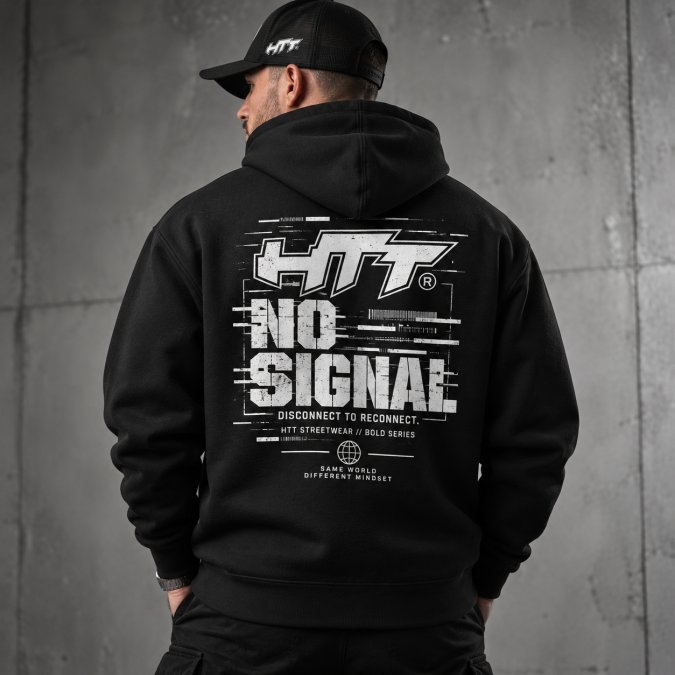
That is the strength of a minimalist gaming setup: you do not have to hide your passion, but you do not have to shout about it either. The accessories you use every day deserve to be comfortable, durable and stylish.
A minimalist gaming setup: the basic principles
A minimalist gaming setup is a workspace in which every accessory has a clear purpose and remains visually calm: fewer items, better quality and a layout that works for both work and relaxation.
The basic principles are simple:
- Choose neutral colors such as black, anthracite or brushed aluminum
- Minimize visible cables
- Prioritize functionality over decoration
- Keep lighting adjustable or switchable off
Ergonomics, desk stand and comfort
Ergonomics are the foundation of any daily setup. A screen at eye level, a keyboard at elbow height, and a chair with good lumbar support prevent discomfort that only builds up after months.
Pay attention to these points:
- Desk stand: your upper arms hang relaxed at your sides, with your elbows at an angle of approximately 90 degrees
- Lumbar support: the lower back is supported, not forced
- Wrist support: your wrists remain neutral, not bent upward or downward
- Adjustability: the height and angle should adapt to how you sit
Cable management and desk organization
Cable management is the fastest way to make a busy setup look calm: visible cables create visual clutter, even when everything else is tidy.
A few practical solutions:
- Use a cable tray under the desktop for power and data
- Bundle loose cables with Velcro instead of zip ties
- Choose a USB-C hub with a single cable to your laptop
- Keep chargers and hubs out of sight in a drawer or tray
Mechanical keyboard and gaming mouse: tactile feedback without the noise
A mechanical keyboard provides tactile feedback that you miss with a standard keyboard: you can feel exactly when a key registers. For daily use, the challenge is not the feedback but the noise.
HTT Monogram Cotton Cap – Embroidered →
Switch types and actuation force: what to look for
Not every silent switch is the same: the differences lie in actuation force, spring weight and the actuation point.
- Linear (red or black): no click, consistent resistance. Actuation force is often between 45 and 60 grams. Quiet enough for a shared space.
- Tactile (brown): a slight bump is felt during actuation, but without a click sound. Actuation force is usually around 55 grams.
- Clicky (blue): audible click, clearly tactile. Actuation force is often 50 to 60 grams, but the sound carries far through walls and doors.
DPI settings, precision and responsiveness
A gaming mouse is about precision, not the highest possible number. For everyday work and gaming, a useful DPI value is usually between 800 and 1600.
What really matters:
- Responsiveness: a mouse with a good sensor responds instantly, without noticeable delay
- Precision: sharp tracking across different surfaces
- Adjustability: buttons and profiles you can customize yourself
- Comfort: a shape that fits your grip, not a marketing photo
Polling rate and latency: what do you really notice?
The polling rate determines how often a mouse reports its position per second. For everyday work, the difference between 125 Hz and 1000 Hz is barely noticeable; for fast-paced games, a higher polling rate can contribute to a smoother feel.
Combining keyboard and mouse in one setup
The best combination is one in which the keyboard and mouse have the same understated look. Choose the same color family, black, anthracite or brushed aluminum, and keep the same level of lighting.
Wireless connectivity, USB-C hub and latency
Modern wireless mice and keyboards achieve latency you do not notice during normal use; for everyday work and gaming, the difference is negligible.
| Situation | Best choice | Why |
|---|---|---|
| Tidy desk, hybrid work | Wireless | Fewer cables, virtually no latency |
| Competitive gaming | Wired | No battery worries, constant connection |
| Switching between devices | Wireless with multi-pairing | Switch quickly between laptop and desktop |
| Fixed workspace, lots of peripherals | USB-C hub | One cable for everything |
Gaming lifestyle clothing: wear your passion without letting it take over
Gaming lifestyle clothing shows who you are without making you feel like a walking billboard. It is about subtle details: a small logo, a muted color, a strong fit.
From hoodie to hybrid work: the same wardrobe
The same wardrobe works for both parts of your day: an oversized hoodie or crewneck that looks relaxed at home works just as well in a video call. The secret lies in the fit and fabric, not the graphics.
Sustainability, material choice, and noise nuisance
Sustainability and material choice determine how long your setup lasts. An accessory that is worn out after a year ultimately costs you more than a sturdier one that lasts for years.
What to look for:
HTT Monogram Cotton Cap – Embroidered →
- Fabric weight: for clothing, GSM says a lot about how sturdy a fabric feels and how well it retains its shape
- Construction: reinforced seams, side-seamed bodies, and double-stitched edges last longer
- Accessory materials: aluminum and steel over cheap plastic
- Noise nuisance and acoustics: silent switches, dampening mats, and a mouse pad with a soft base keep your room quiet
Noise nuisance in a shared space: how to deal with it
A mechanical keyboard with click switches can be audible through a wall, just like a gaming chair with squeaky parts or a constantly audible fan.
- Mat under your keyboard: a felt or rubber mat dampens the contact noise between the keyboard and desk. A desk with a solid top carries sound farther than one with a lightweight core.
- Mouse pad with a soft base: a thick fabric mouse pad absorbs the sound of the mouse feet. A hard plastic mat reflects it instead.
- Dampening inside the case: foam or silicone rings between the circuit board and the case take the sharp edge off the sound. This is one of the cheapest adjustments with the greatest effect.
- Silent switches: linear switches without a click are generally the quietest. Tactile switches with a rubber damper are a middle ground.
- Flooring and curtains: a room with hard floors and bare walls echoes more. A rug and heavy curtains dampen the sound without you having to modify your setup.
Material choice and lifespan: what to look for
Sustainability starts with the material. For accessories, aluminum is often better than plastic: stronger, more dimensionally stable, and better at conducting heat. For clothing, GSM says a lot about how sturdy a fabric feels and how well it retains its shape; heavier cotton with a tight weave lasts longer than thin fabric.
Sound and sustainability as one choice
Sound and sustainability can be connected: a quiet setup may vibrate less, experience less wear, and therefore last longer. Those who choose quiet often choose quality too.
How to choose your subtle gaming accessories: step by step
Choosing subtle gaming accessories for everyday use becomes easy when you follow a set order: start with what your body interacts with most and work outward.
Conclusion
Subtle gaming accessories for everyday use require a different perspective from the standard gaming market: not the brightest lighting or highest specifications, but comfort, quietness, and materials built to last. This keeps your setup useful for both work and relaxation.
Frequently Asked Questions
What are the best subtle gaming accessories for a minimalist setup?
Choose accessories that perform without standing out: a mechanical keyboard with silent switches, a gaming mouse with adjustable DPI settings in a neutral color, closed-back noise-cancelling headphones, and a USB-C hub to keep your desk organization tidy. Avoid bright RGB lighting and choose matte finishes. This keeps your gaming environment suitable for work and relaxation.
How do you combine gaming style with a professional everyday look?
Start with a neutral foundation: a heavyweight T-shirt or crewneck in black, charcoal, or off-white, combined with a cap featuring subtle embroidery. Choose items without large graphics and limit your color palette to two or three shades. This lets you wear gaming lifestyle clothing that also works in the office or while working hybrid, without it feeling like merchandise.
Why choose subtle gaming accessories instead of striking RGB designs?
Striking RGB lighting suits a dedicated game room, but works less well in a space where you also work or study. Subtle accessories in neutral colors with matte finishes suit a hybrid workspace. They reduce distractions, keep your desk organization tidy, and create an aesthetic that works all year round, not just while gaming.
Which accessories are both functional for gaming and everyday use?
A mechanical keyboard with tactile feedback and a gaming mouse with adjustable precision are just as useful for work as for gaming. A USB-C hub with plug-and-play functionality connects all your devices. Good noise-cancelling headphones help you stay focused while working and improve audio quality while gaming. An adjustable desk stand and wrist support improve comfort in both situations.